

Table of Contents
Every growing company hits the same wall. Files sit in five different tools, policies hide in old emails, and new hires ask the same questions again and again. Business corporate intranets solve this problem. A good intranet gives every employee one trusted place to find news, documents, people and tools.
This guide explains business corporate intranets in plain language. It covers what they are, the features that matter, the tech behind them, security basics and a simple plan to build one. It is written for CTOs, product managers, developers, testers, researchers and digital marketers who want a clear, practical view without the jargon.
What Are Business Corporate Intranets?
A corporate intranet is a private website or portal that only employees (and approved users) can open. Think of it as your company's internal home page. It runs on your own servers or in the cloud, and it sits behind a login.
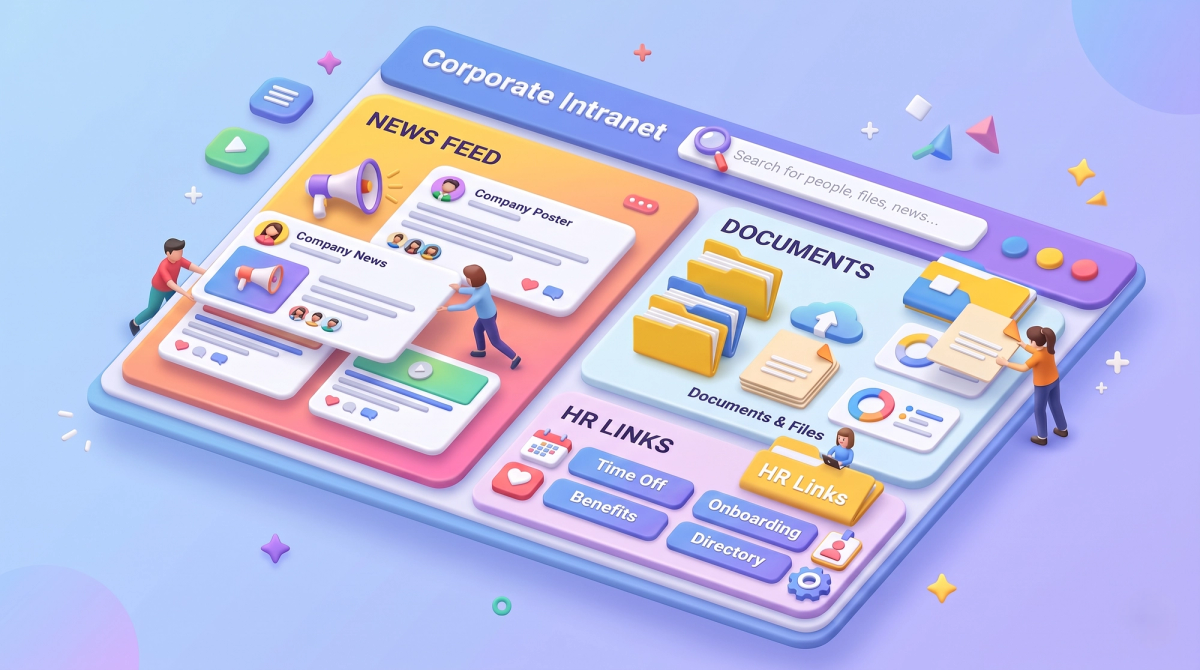
A company intranet usually brings together:
- Company news and announcements
- Policies, forms and HR information
- Shared documents and knowledge base articles
- Employee directory and org charts
- Links to daily tools such as email, CRM, ticketing and chat
The goal is simple: help people find what they need fast, so they can do their work with fewer interruptions. Older intranets were mostly static notice boards. Modern business corporate intranets are closer to a digital workplace, with search, chat, workflows and even AI assistants built in.
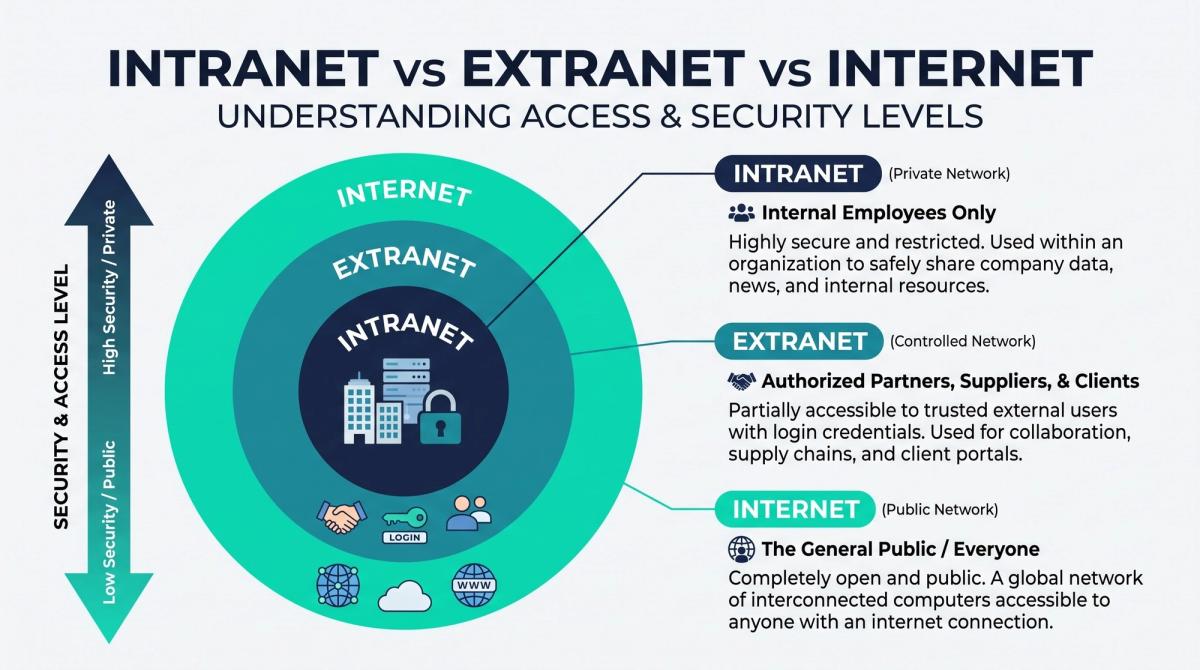
Intranet vs Extranet vs Internet
These three terms are often mixed up. Here is the quick difference.
| Network | Who can access it | Typical use |
|---|---|---|
| Internet | Everyone | Public websites, marketing pages |
| Intranet | Employees only | Internal news, HR, documents, tools |
| Extranet | Employees plus approved partners or clients | Shared project portals, vendor dashboards |
If you also run a public site, your intranet and your business and corporate website should feel like one brand, but they serve very different people and need very different security.
Why Companies Need a Corporate Intranet
A corporate intranet is not just a "nice to have." It helps in clear, practical ways.
1. Faster access to information. Staff stop hunting through chats and inboxes. One search bar finds policies, files and people.
2. Better internal communication. Leaders can share news with the whole company, or only with one team, location or role.
3. Smoother onboarding. New hires get a single checklist, a welcome page and every form they need on day one.
4. Less repeated work. A good knowledge base answers common questions once, instead of fifty times.
5. Stronger security and control. Sensitive files live in one governed system instead of personal drives and random apps.
6. Support for remote and hybrid teams. Everyone sees the same information, no matter where they work.
For tech teams, there is one more benefit: a well-built intranet becomes a stable platform where internal tools, dashboards and automations can live.
Core Features of Business Corporate Intranets
Not every feature is needed on day one. Start with the essentials, then grow.
Must-have features
- Enterprise search: One box that searches pages, files, people and apps, with filters and smart suggestions.
- Single sign-on (SSO) and role-based access: Employees log in once, and see only what their role allows.
- Document management: Version history, tagging, permissions and easy sharing.
- News and announcements: Targeted posts with comments and read tracking.
- Employee directory: Profiles, skills, teams and contact details.
- Mobile-friendly design: Many staff, such as field and retail teams, use phones first.
Nice-to-have features
- HR self-service: Leave requests, payslips, policy sign-off.
- Workflow automation: Approvals, ticket routing and reminders. See how AI workflows and automations can remove repetitive steps.
- AI assistant or chatbot: Staff ask questions in plain language and get answers from your own documents. A well-trained AI-powered chatbot can cut help desk load.
- Analytics dashboard: Page views, search terms, popular content and drop-off points.
- Integrations: CRM, ERP, project tools, calendars and chat apps.
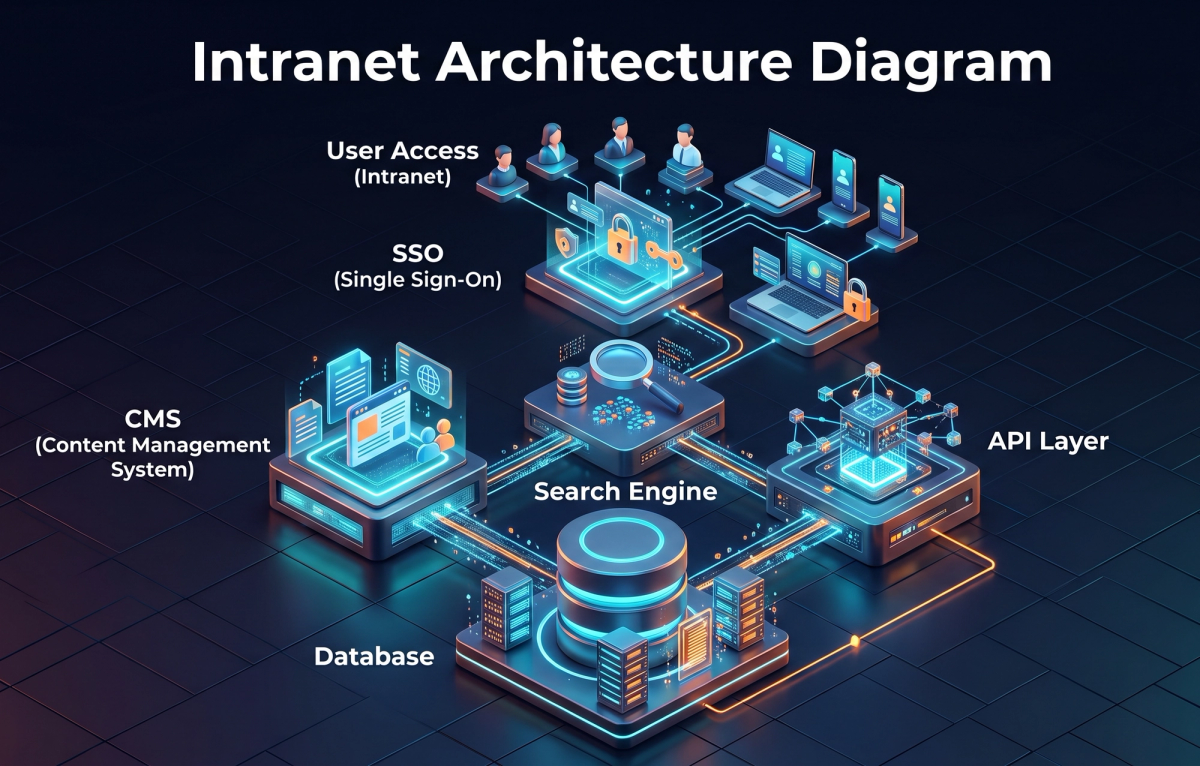
Architecture and Tech Stack: A Developer's View
Business corporate intranets can be built in several ways. The right choice depends on size, budget, compliance needs and your team's skills.
Common building blocks
- Identity layer: SSO using SAML or OpenID Connect, tied to Azure AD, Okta, Google Workspace or similar.
- Content layer: A CMS (traditional or headless) for pages, news and knowledge articles.
- Search layer: Elasticsearch, OpenSearch or a managed search service, with permission-aware results.
- API layer: REST or GraphQL APIs that connect HR, CRM, ticketing and file storage.
- Front end: React, Next.js or similar for fast, accessible interfaces.
- Data layer: Relational databases for structured data, object storage for files.
- Hosting: Cloud, on-premises or hybrid, depending on data rules.
Many teams choose a headless approach: content is managed in one place and delivered through APIs to the web portal, mobile app and chat tools. This keeps things flexible. If you need a custom portal, a web design and development partner can help you pick the right stack and avoid costly rework.
Corporate Intranet Security Best Practices
An intranet holds some of your most sensitive information, so security must come first, not last.
- Use SSO and multi-factor authentication (MFA). Strong identity is your first line of defence.
- Apply least-privilege access. People get only the access they need. Review roles every quarter.
- Encrypt data in transit and at rest. Use HTTPS everywhere and encrypted storage.
- Make search permission-aware. Search must never show a title or snippet from a file the user cannot open.
- Log and monitor activity. Keep audit trails for logins, downloads and permission changes.
- Patch and test regularly. Run vulnerability scans and penetration tests on a schedule.
- Plan for exits. Remove access the same day someone leaves.
- Follow your rules. Check data residency and compliance needs, such as GDPR or industry standards, before you pick a host.
Remember that an intranet is not automatically safe just because it is "internal." Many breaches start with a stolen employee login.

Build vs Buy: Which Path Fits Your Company?
| Option | Best for | Pros | Cons |
|---|---|---|---|
| Buy a ready-made platform (SaaS intranet) | Small and mid-size teams that need speed | Fast launch, vendor support, lower upfront cost | Limited customisation, recurring fees |
| Customise a platform (such as SharePoint or a CMS) | Teams already using that ecosystem | Familiar tools, good integrations | Needs skilled admins and developers |
| Build custom | Large or regulated companies with unique workflows | Full control, tailored UX, deep integrations | Higher cost and longer timeline |
A simple rule: buy for speed, build for fit. Many companies start with a platform and add custom modules as they learn what people really use.
Step-by-Step Plan to Build a Corporate Intranet
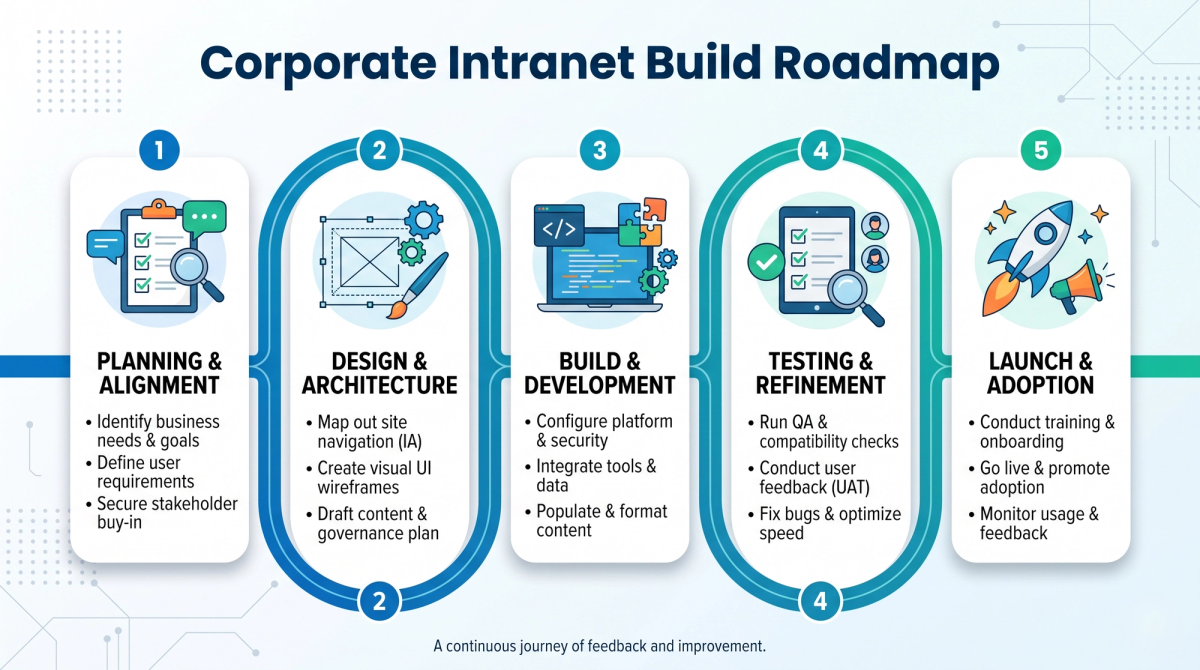
Follow this five-step plan to keep the project clear and on track.
Step 1: Define goals and users. Ask what problem you are solving. Is it slow onboarding, scattered files or poor communication? Interview staff from different teams and write down the top ten tasks they do every week.
Step 2: Plan content and structure. List your content, remove outdated items and group the rest into simple categories. Name each owner. A page with no owner will go stale.
Step 3: Design for people. Keep navigation shallow, labels plain and search prominent. Follow accessibility standards (WCAG) so everyone can use the portal. Reuse your brand colours, fonts and tone so the intranet feels like your company. Our guide on brand guideline creation shows how to turn brand rules into a system that designers and developers can share.
Step 4: Build, integrate and test. Set up SSO, content types, search and key integrations. Test early and often (see the next section).
Step 5: Launch, train and improve. Start with a pilot group, collect feedback, then roll out company-wide. Share short how-to videos and name a few "intranet champions" in each team.
Testing and QA for Intranet Projects
Testers and developers should treat an intranet like a real product. Cover these areas:
- Functional tests: Login, search, uploads, workflows and notifications.
- Permission tests: Try every role and confirm each sees only the right content.
- Performance tests: Check load time with real file sizes and peak-hour traffic.
- Security tests: Scan for common web risks and check session handling.
- Accessibility and device tests: Screen readers, keyboard use, tablets and phones.
- Integration tests: Confirm data syncs correctly with HR, CRM and other systems.
Automate regression tests so every update stays safe.
Do Intranets Need SEO?
Yes, in a different way. Public SEO is about Google. Intranet SEO is about helping employees find answers inside your portal. The same ideas apply: clean page titles, clear headings, good tagging, fresh content and a fast site. Review your internal search logs often. The terms people search for, and the ones that return nothing, show exactly what content is missing.
If your company also runs public pages for customers, a technical SEO audit keeps those pages fast, crawlable and healthy, so your public site and your internal portal both work well.
Common Intranet Mistakes to Avoid
- Launching without clear goals or an owner
- Copying the org chart into the navigation instead of using real tasks
- Letting content go stale
- Ignoring mobile users
- Skipping user training
- Treating security as a final checklist item
- Never measuring results
How to Measure Intranet Success
Track a small set of numbers and review them monthly:
- Adoption: Active users and return visits
- Search quality: Top searches, zero-result searches and click-through
- Content health: Pages updated in the last 6 months
- Time saved: Fewer repeat questions to HR and IT
- Satisfaction: Short pulse surveys and feedback buttons
If you add a chatbot or assistant, measure it too. Our post on analytics for bot performance explains the metrics that matter and how to turn conversation data into better answers.
How Cinute InfoMedia Can Help
Cinute InfoMedia (CIM) is a web development and digital marketing company that builds custom websites, brand identity, SEO, performance marketing, AI-powered automations and intelligent chatbot systems. For intranet projects, CIM can help with planning, UX design, secure custom development, AI search and assistants, and ongoing improvement. Ready to talk? Contact the CIM team for a free digital audit.
Frequently Asked Questions
What is a corporate intranet in simple words?
It is a private company website that only employees can open. It holds news, documents, tools and contacts in one place.
What is the difference between an intranet and an extranet?
An intranet is for employees only. An extranet also lets approved partners, vendors or clients log in to shared areas.
How long does it take to build a corporate intranet?
A ready-made platform can launch in weeks. A custom build with integrations often takes a few months, depending on scope.
Is a corporate intranet secure by default?
No. It needs SSO, MFA, role-based access, encryption, logging and regular testing.
Conclusion
Business corporate intranets work best when they stay simple, secure and useful. Start with real employee problems, pick a stack that fits your team, protect access with SSO and MFA, test every role and measure what people actually use. Then improve a little every month. Do that, and your intranet becomes more than a portal. It becomes the place where your company gets work done.
Related Articles
Instagram Reels Algorithm 2026: A Simple Guide for Tech-Savvy Teams
The Instagram Reels algorithm in 2026 ranks videos by watch time, DM sends and likes per reach. This easy guide explains how Reels are tested, what changed recently, and a practical checklist for developers, marketers, CTOs and product teams.
Brand Guideline Creation: A Step-by-Step Guide for Tech Brands
Brand guideline creation turns your logo, colours, fonts and voice into one clear rulebook for designers, developers, testers and marketers. This easy guide covers the core components, an 8-step process, design tokens for code, and how to connect your brand to SEO and AI.
Voice Search SEO Preparation Guide
Voice search rewards clear answers, fast pages and smart markup. This guide gives developers, marketers and product teams a practical ten-step plan to prepare their site for voice search SEO in 2026.