
Table of Contents
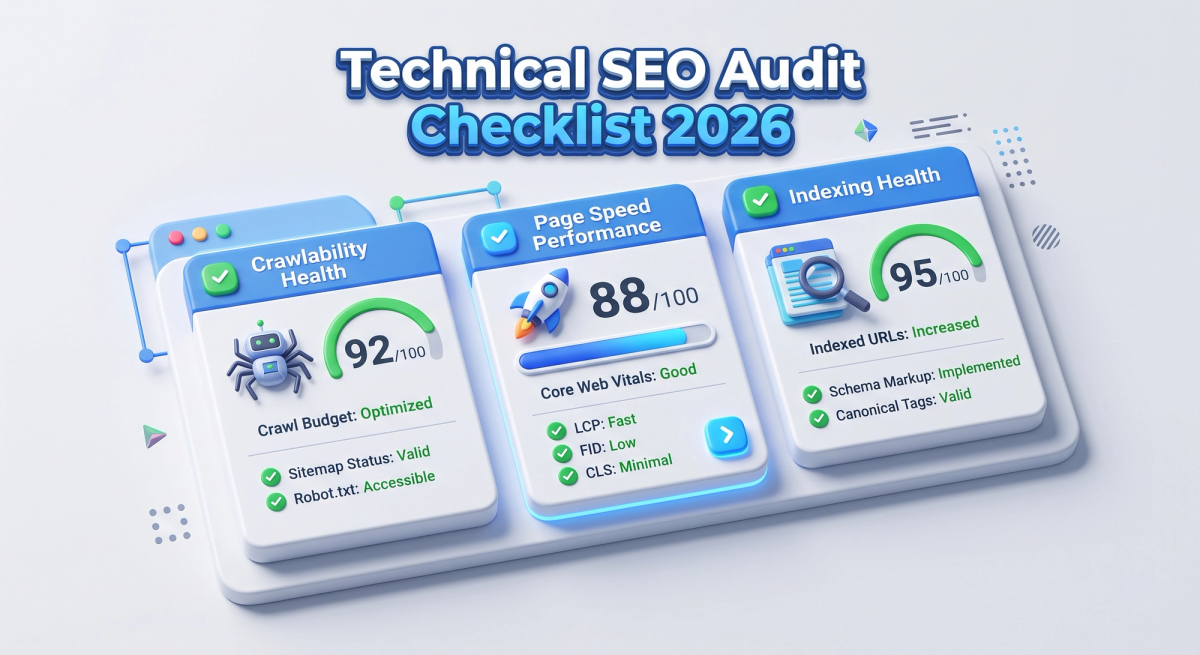
You can publish brilliant content and still sit on page five. The reason is often invisible: a blocked resource, a slow template, a broken canonical or a page Google never rendered properly. That is why a technical SEO audit is the first job in any serious organic growth plan, and why it needs a refresh every year.
Search has changed a lot. Google now measures responsiveness with INP, mobile-first indexing is the default, and AI answer engines are crawling your pages alongside traditional bots. This technical SEO audit checklist for 2026 gives you a clear, repeatable process you can hand to a developer, a QA tester or a marketing lead.
What Is a Technical SEO Audit?
A technical SEO audit is a structured review of the infrastructure that lets search engines find, crawl, render, index and understand your website. It ignores keywords and copy at first. Instead, it asks whether your site is fast, accessible, secure and machine-readable.
Think of it like a code review for search visibility. You are not judging the story; you are checking that the plumbing works.
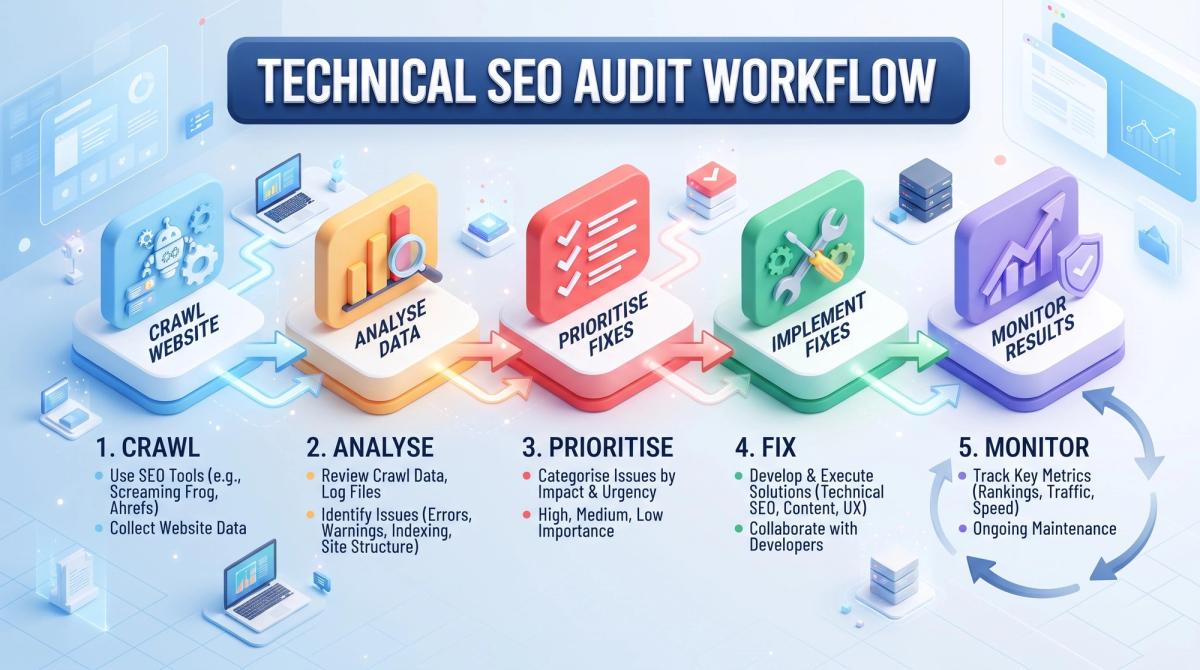
A good audit follows five stages:
- Crawl the site like a search engine would.
- Analyse the data against the checklist below.
- Prioritise by impact and effort.
- Fix issues with your dev team.
- Monitor results and re-crawl.
Tools You Need Before You Start
You do not need an expensive stack. These cover almost everything:
- Google Search Console for indexing, crawl stats and Core Web Vitals field data.
- A site crawler such as Screaming Frog or Sitebulb for a full technical crawl.
- PageSpeed Insights and Lighthouse for lab and field performance data.
- Chrome DevTools for rendering, network and JavaScript checks.
- Server log access for real Googlebot behaviour.
- Rich Results Test and Schema Markup Validator for structured data.
1. Crawlability Checks
If a search engine cannot reach a page, nothing else matters. Start here.
Robots.txt. Open yourdomain.com/robots.txt and confirm you are not blocking important folders, CSS or JavaScript files. Remember that robots.txt controls crawling, not indexing. A blocked URL can still appear in results if other sites link to it.
XML sitemap. Your sitemap should list only canonical, indexable URLs that return a 200 status. Remove redirects, 404s and noindexed pages. Submit it in Search Console and reference it in robots.txt.
Crawl errors. In Search Console, open the Pages report and the Crawl Stats report. Look for spikes in 5xx errors, slow server response and soft 404s. If you wonder how to fix crawl errors in Google Search Console, the answer is simple: fix the cause on the server or template, then use "Validate fix" to request a recheck.
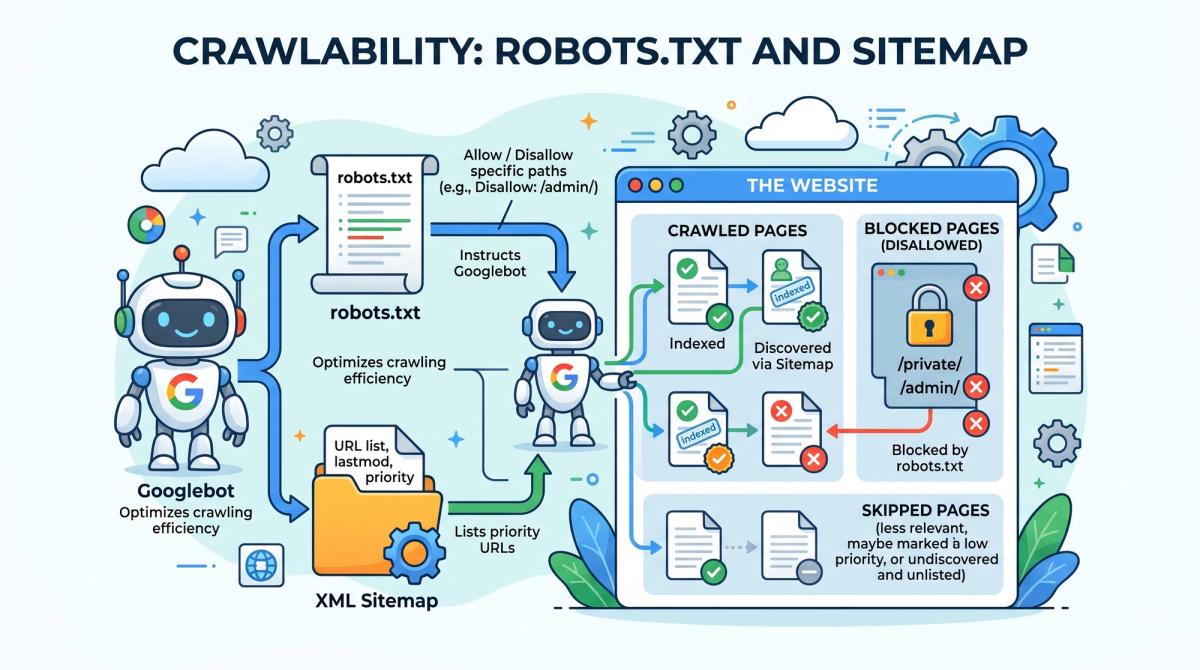
Crawl budget. For most sites, crawl budget is not a problem. It matters on very large or fast-changing sites with hundreds of thousands of URLs. If that is you, cut waste from faceted navigation, session parameters and infinite calendars.
Orphan pages. Compare your crawl data with your sitemap and analytics. Pages with no internal links are hard for crawlers to discover and rarely rank.
2. Indexability Checks
Crawling and indexing are different. A page can be crawled and still left out of the index.
- Meta robots and X-Robots-Tag. Look for accidental
noindextags, especially after a staging-to-live release. This is one of the most expensive launch mistakes. - Canonical tags. Every indexable page should have a self-referencing canonical, or point to the correct preferred version. Check for canonicals that point to redirected, blocked or noindexed URLs.
- Duplicate content. Check URL variants: HTTP and HTTPS, www and non-www, trailing slashes, uppercase, and parameter versions. Consolidate with 301 redirects and canonicals.
- Index coverage. In Search Console, review "Crawled, currently not indexed" and "Discovered, currently not indexed". These often point to thin content, weak internal links or duplication.
- Pagination. Make sure paginated pages are crawlable through normal links. Google no longer uses rel=next and rel=prev as an indexing signal.
A quick test: search site:yourdomain.com and compare the rough number with your sitemap count. A big gap deserves investigation.
3. Site Architecture and Internal Linking
Good structure helps users and crawlers. Aim for these rules:
- Keep important pages within three clicks of the homepage.
- Use clean, readable, lowercase URLs with hyphens.
- Build topic clusters: one pillar page supported by related articles that link to each other.
- Use descriptive anchor text, not "click here".
- Fix redirect chains and loops. Each hop wastes crawl time and dilutes signals.
- Repair broken internal links (404s) and replace links that point to redirects.
Internal links are also where technical and content work meet. If you are planning a site structure from scratch, our web design and development team builds SEO-ready architecture from day one.
4. Core Web Vitals and Page Speed
Page experience is still a tie-breaker in competitive results, and slow pages hurt conversions even when they rank. Google's three Core Web Vitals are:
| Metric | What it measures | Good threshold |
|---|---|---|
| LCP (Largest Contentful Paint) | Loading speed of the main content | 2.5 seconds or less |
| INP (Interaction to Next Paint) | Responsiveness to user input | 200 milliseconds or less |
| CLS (Cumulative Layout Shift) | Visual stability | 0.1 or less |
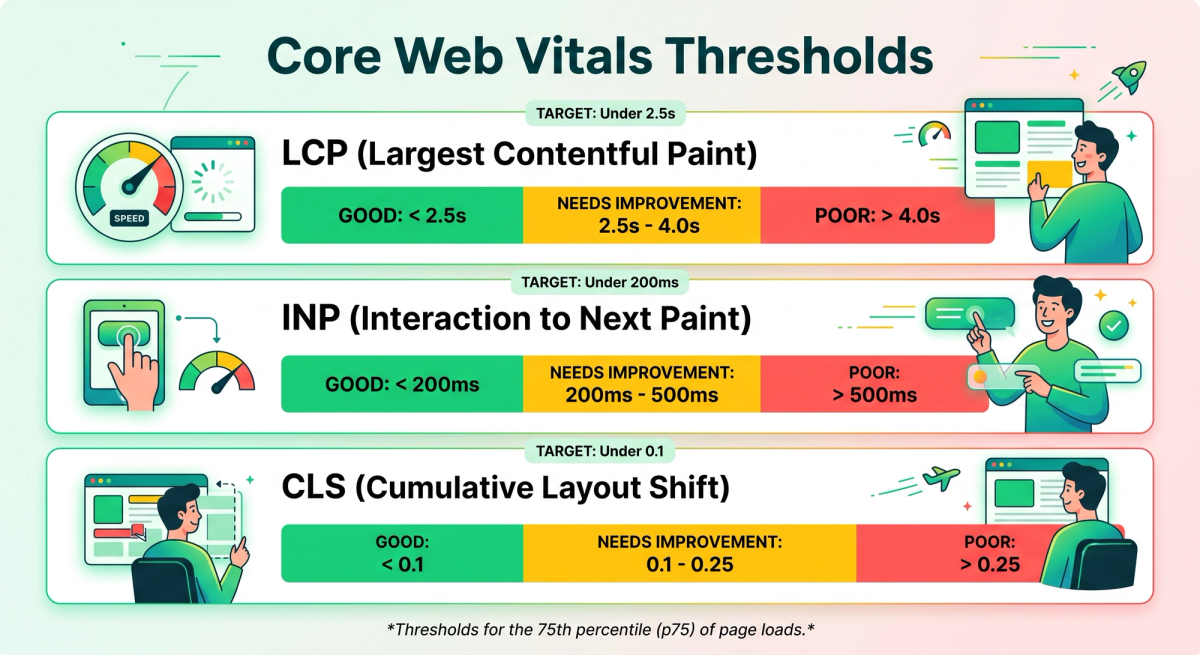
Always judge these with field data (real users, from Search Console or the Chrome UX Report), not only lab scores from Lighthouse. Both are useful, but field data is what Google assesses.
How to improve your INP score. INP replaced First Input Delay in 2024 and is now the hardest metric for many sites. The usual fixes are:
- Break up long JavaScript tasks so the main thread stays free.
- Remove or defer unused third-party scripts, such as tag managers loaded with old tags.
- Reduce heavy event handlers and avoid layout thrashing.
- Use lightweight components and avoid hydrating the whole page when only a small part is interactive.
To improve LCP: preload the hero image, serve modern formats such as WebP or AVIF, use a CDN, and reduce server response time. To fix CLS: set width and height on images and embeds, reserve space for ads, and avoid injecting content above existing content.
Framework choice matters here. Modern stacks with server rendering and smart code splitting, such as Next.js development, make strong speed scores far easier to reach.
5. Mobile-First Indexing
Google crawls and indexes the mobile version of your site. If content, links or structured data exist only on desktop, they may be missed. Check that:
- The mobile and desktop versions carry the same main content, headings and metadata.
- The viewport meta tag is set correctly.
- Tap targets are large enough and text is readable without zooming.
- Images and videos on mobile are crawlable and not lazy-loaded in a way that hides them from bots.
- Pop-ups and interstitials do not block the main content.
6. JavaScript SEO and Rendering
Google can render JavaScript, but it adds delay and risk. Many AI crawlers do not run JavaScript at all, so content that only appears after client-side rendering may be invisible to them.
Test it this way:
- Open the page and choose View Source. Is your key content in the raw HTML?
- Use the URL Inspection tool in Search Console and check the rendered HTML.
- Compare crawls with JavaScript rendering turned on and off.
If important text, links or metadata appear only after scripts run, move to server-side rendering (SSR), static generation or pre-rendering. This is among the most reliable JavaScript SEO best practices for developers and testers alike.
7. Structured Data and Schema Markup
Structured data tells search engines what a page is about in a format machines can parse. Use JSON-LD, which Google recommends.

Priority schema types for most business sites:
- Organization and WebSite on the homepage
- Article or BlogPosting on blog posts
- BreadcrumbList on deeper pages
- Product, Review and Offer for e-commerce
- LocalBusiness for location-based companies
Validate every template with the Rich Results Test. Keep markup honest: it must match what users can see on the page. Note that Google has limited FAQ and How-to rich results to a narrow set of sites, so add that markup for clarity, not for a guaranteed visual boost.
8. HTTPS, Security and Status Codes
- HTTPS everywhere. Confirm a valid certificate, no mixed content and a single 301 from HTTP to HTTPS.
- HSTS and sensible security headers add trust and protect users.
- Status codes. Real 404 pages must return a 404 (not a soft 200). Permanent moves need 301s. Temporary moves use 302 or 307.
- Server health. Watch for 5xx errors and slow time to first byte, which hurt crawling and LCP together.
9. International SEO and Hreflang
If you target several countries or languages, check your hreflang tags. Each version must reference the others (return tags), use correct language and region codes, and include an x-default where it makes sense. Pair hreflang with self-referencing canonicals. Errors here cause the wrong country page to rank, or pages to compete with each other.
10. Log File Analysis
Crawl tools simulate bots; server logs show the real thing. Analyse your logs to see:
- Which URLs Googlebot actually requests, and how often.
- Whether bots waste time on parameters, redirects or errors.
- How quickly new pages are discovered.
- Whether AI crawlers such as GPTBot or ClaudeBot visit your content.
Logs are the most honest data in SEO. If your team has the access, make them a standing part of the audit.
11. AI Search Readiness in 2026
AI Overviews and chat-style answer engines now sit beside the classic ten blue links. The technical basics that feed them are the same ones you already audit:
- Crawl access - Decide deliberately which bots you allow in robots.txt. Blocking a bot also removes you from its answers.
- Server-rendered content - Keep key facts in the HTML, not hidden behind scripts.
- Clear structure - Use logical headings, short paragraphs, tables and lists that are easy to extract.
- Entity clarity - Use Organization schema, consistent names and an accurate About page.
- Freshness signals - Show real publish and update dates and keep them accurate.

Optional files such as llms.txt are still unproven as a ranking or citation signal, so treat them as an experiment rather than a priority.
Quick Priority Guide: What to Fix First
| Priority | Issue | Why it matters |
|---|---|---|
| Critical | Accidental noindex, blocked robots.txt, site down | Pages vanish from search |
| High | 5xx errors, redirect chains, wrong canonicals | Wastes crawl and splits signals |
| High | Poor LCP and INP on key templates | Hurts rankings and conversions |
| Medium | Missing schema, weak internal links | Limits understanding and discovery |
| Low | Minor markup warnings, cosmetic issues | Small, long-term gains |
Common Technical SEO Mistakes to Avoid
- Auditing once and never again.
- Fixing low-impact warnings while critical issues wait.
- Trusting lab scores and ignoring field data.
- Leaving staging noindex tags in place after launch.
- Changing URLs in a redesign without a redirect map.
How Often Should You Run an Audit?
Run a full technical SEO audit once or twice a year and after any major change, such as a redesign, migration or CMS switch. Add a monthly health check in Search Console and a weekly automated crawl on large sites. Automation helps here: our team uses AI workflows and automation to flag broken links, indexing drops and speed regressions before they cost traffic.
Frequently Asked Questions
What is included in a technical SEO audit? Crawlability, indexability, site architecture, page speed, mobile usability, JavaScript rendering, structured data, security and international setup.
How long does a technical SEO audit take? A small site takes a few days. Large or complex sites can take several weeks, including time to analyse logs.
Is technical SEO more important than content? They work together. Technical SEO makes sure content can be found and ranked, and strong content gives that foundation something to rank.
Can I run an audit for free? Yes. Google Search Console, PageSpeed Insights, Lighthouse and the free tier of most crawlers cover the essentials.
Final Thoughts
Technical SEO is not glamorous, but it protects every other marketing investment. Work through crawlability, indexability, architecture, speed, rendering, structured data and AI readiness in that order, fix by priority, and monitor continuously.
Once the foundations are solid, strengthen what sits on top with focused on-page SEO and high-quality SEO content writing. You can also explore our full range of SEO services, or let our specialists run a deep-dive technical SEO audit for you.
Ready to find out what is holding your site back? Request your free digital audit from Cinute InfoMedia and get a clear, prioritised action plan.
Related Articles

Analytics for Bot Performance: How to Measure, Improve and Prove Your Chatbot's Value
Your chatbot is live, but is it working? This guide explains analytics for bot performance in plain language: the metrics that matter, how to set up tracking, and how to turn conversation data into better answers, lower costs and measurable ROI.

Logo Design Trends 2026: 8 Shifts Every Tech Brand Must Know
Logos now work like small pieces of software. Discover the 8 logo design trends of 2026, from adaptive systems to motion and dark-mode palettes, plus a technical checklist for developers and marketers.
How to Turn YouTube Shorts Into a Measurable Performance Marketing Channel
Are YouTube Shorts ads worth it? Learn how to turn Shorts into a measurable performance marketing channel: which campaign types to use, which metrics matter (hook rate, CPA, ROAS, view-through conversions), how to build vertical creative that converts, and how to measure results honestly.